🎮 Controls
📌 Overview
This section explains all controls for PC (keyboard + mouse), Mobile (touchscreen), and Gamepad (controller). Each platform has slightly different inputs, but the actions are the same: movement, combat, survival actions, and utility (map, scent, night vision, etc.).
🖥️ PC Controls (Keyboard & Mouse)
Action | Key |
|---|---|
Basic Attack | Left Mouse |
Special Attack | F |
Jump | Space |
Custom Movement | C |
Grab / Carry | G |
Eat / Drink | E |
Emotes | Q |
Trot Toggle | Z |
Sprint Toggle | X |
Toggle Fast Movement (Walk/Run) | Shift |
Rest | R |
Scent | B |
Night Vision | N |
Hide GUI | H |
Toggle Map | M |
📱 Mobile Controls (Touchscreen)
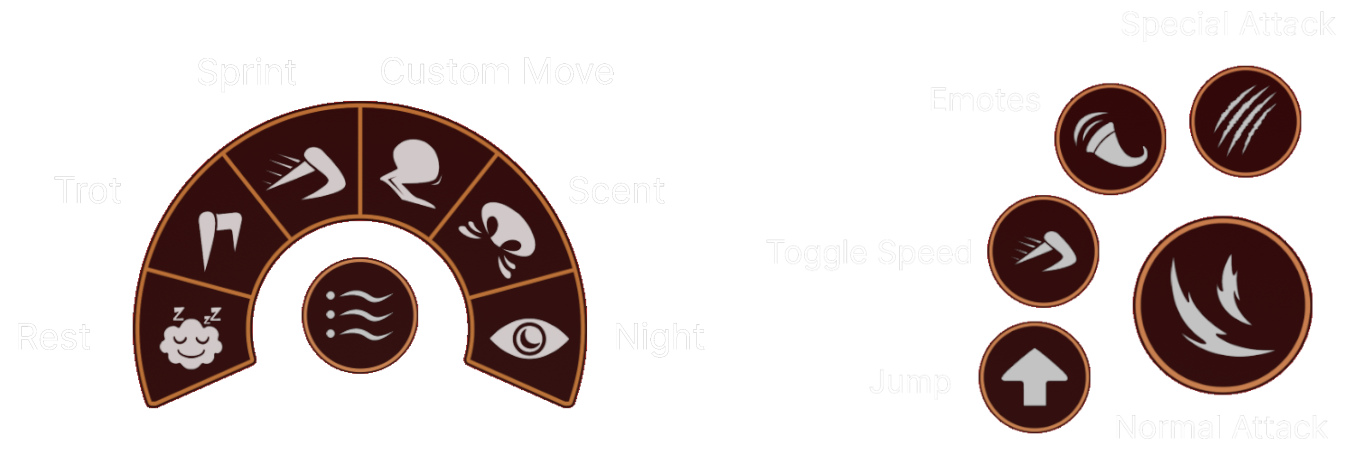
On mobile, all actions are accessible through on-screen buttons:
Movement Joystick: Bottom left
Attack Buttons: Bottom right (Normal + Special)
Jump: Up arrow button
Emotes: Radial menu
Rest, Trot, Sprint, Custom Move, Scent, Night Vision: Circular icons on left side
Map & Settings: Top right buttons
🎮 Gamepad Controls (XBox/PlayStation)
Action | Xbox / Controller Button |
|---|---|
Basic Attack | RT |
Special Attack | LT |
Jump | A |
Custom Movement | B |
Grab / Carry | X |
Eat / Drink | Y |
Emotes | Y (hold / radial menu) |
Trot Toggle | LB |
Sprint Toggle | RB |
Toggle Speed | Left Stick Click (L3) |
Rest | D-Pad Down |
Scent | D-Pad Left |
Night Vision | D-Pad Right |
Hide GUI | H (if supported) |
Toggle Map | M (if supported) |
✅ Tips
Controls may slightly differ depending on animal abilities (some have unique custom moves).
Check the in-game Controls menu anytime if you forget a key.
If something isn’t working (like controller inputs not recognized), check your Roblox settings and reconnect your device.